Ableton Live is a powerhouse for music production and performance, but its true potential is unlocked with the right hardware controller. The tactile feel of pads, knobs, and faders can dramatically speed up your workflow and inspire new creative possibilities. From clip launching to intricate sequencing, a dedicated controller bridges the gap between idea and execution.
Choosing the best controller depends on your primary needs: are you a keyboardist, a beatmaker, or a live performer? This roundup covers a spectrum of options, from compact pad grids to full-featured keyboards and standalone workstations. Each product offers unique integration with Ableton Live, designed to give you hands-on control and a more intuitive music-making experience.
Our Recommended Controllers for Ableton Live
- Akai Professional MPD226
- Novation Launchkey 49 MK2
- Ableton Push 3 Standalone Workstation
- Novation Launchpad Pro MK3
- Novation Launchpad X
- Native Instruments S49 MK3
- Native Instruments Maschine Mk3
- Akai Professional APC40 MKII
- Akai APC Key 25 MK2
- Arturia KeyLab Essential 61 Mk3
Akai Professional MPD226

For producers who prioritize drum programming and sampling, the Akai MPD226 is a focused and powerful tool. It centers on 16 renowned MPC-style pads that are velocity and pressure-sensitive, providing a responsive and authentic finger-drumming experience. The RGB illumination offers clear visual feedback for pad status and bank selection.
Beyond the pads, it offers substantial control with 36 assignable parameters via faders, knobs, and buttons spread across three banks. This allows you to manage mix levels, plugin parameters, or transport controls without touching the mouse. The ability to access 64 pads via four banks makes it a compact yet extensive grid for triggering samples and clips.
Novation Launchkey 49 MK2
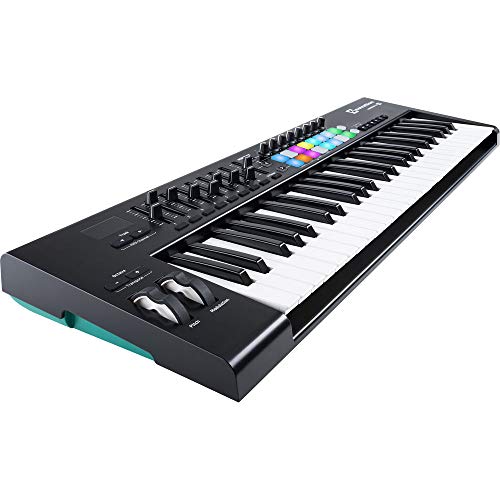
The Novation Launchkey 49 is a balanced solution for musicians who want a traditional keyboard alongside Ableton-specific controls. The 49-note keyboard is velocity-sensitive, making it suitable for playing melodies and chords. It integrates directly with Ableton Live, allowing for instant mapping and control over session navigation and clip launching.
This controller includes 16 RGB pads for drum programming, 8 assignable knobs, and dedicated transport buttons. The inclusion of a sustain pedal jack and pitch/mod wheels rounds out its functionality for expressive playing. It’s a complete package that supports both the composition and performance aspects of working within Ableton Live.
Ableton Push 3 Standalone Workstation

The Ableton Push 3 represents the pinnacle of integration, designed from the ground up as the definitive hardware partner for Live. In its standalone configuration, it functions as a complete instrument with its own processor, storage, and audio interface, letting you create music without a computer. This makes it an incredibly powerful and portable studio centerpiece.
Its 64 MPE-enabled pads are a major highlight, detecting not just strikes but also horizontal and vertical finger movement for unparalleled expressiveness. You can add vibrato, bend notes, and control dynamics directly from the pad surface. When connected to a computer, it provides deep, intuitive control over every aspect of Ableton Live, from sequencing and playing to mixing and sound design.
Novation Launchpad Pro MK3

The Launchpad Pro MK3 is a professional-grade grid controller built for robust live performance and production. Its 64 large, velocity-sensitive pads provide excellent tactile feedback and visually mirror your Ableton Live session with RGB color matching. The integration is seamless, offering direct control over clip launching, mixer functions, and device parameters.
A standout feature is its built-in 4-track sequencer, which allows you to compose and arrange patterns independently of your DAW. With features like probability and mutation, you can generate evolving musical ideas on the fly. This makes it much more than a simple launchpad; it’s a creative sketchpad and performance instrument in one.
Novation Launchpad X

The Launchpad X offers the core Launchpad experience in a more accessible and portable format. It shares the deep Ableton Live integration of its Pro sibling, allowing you to launch clips, control the mixer, and manipulate devices without using a computer mouse. The setup is straightforward with plug-and-play USB connectivity.
Its pads are velocity and pressure-sensitive, enabling dynamic playing for drums and melodies. Useful features like Note and Scale modes lock the grid to specific musical scales, helping you play chords and melodies correctly every time. For performers and producers seeking a reliable, intuitive grid controller without the built-in sequencer, the Launchpad X is an excellent choice.
Native Instruments S49 MK3

The Native Instruments S49 MK3 is a premium keyboard controller that excels in software integration, particularly with Native Instruments’ own ecosystem and Ableton Live. Its next-generation NKS technology provides automatic mapping and visual feedback for a vast library of sounds, streamlining your workflow. The 49-key Fatar keybed offers a quality playing feel with polyphonic aftertouch for detailed expression.
While deeply tied to Komplete, it also functions superbly as a smart controller for Ableton Live. The color screens and dedicated navigation buttons provide clear information and quick access to instruments and mix parameters. It’s ideal for composers and producers who want a premium keyboard action and deep, visual integration with their sound libraries.
Native Instruments Maschine Mk3

The Maschine Mk3 is a fully integrated groove production studio centered around its iconic pad grid. While it shines with the included Maschine software, it also serves as a powerful controller for Ableton Live. Its high-quality pads, tactile knobs, and bright screens offer a hands-on approach to beat-making, sampling, and performance.
A significant advantage is its built-in audio interface, which allows you to connect monitors, headphones, and a microphone directly. This consolidates your setup. The tight integration with Ableton via the Maschine MK3 Controller Script allows you to drive Drum Racks, transport controls, and mixer functions, blending Maschine’s workflow with Live’s arranging power.
Akai Professional APC40 MKII

The APC40 MKII is a legacy controller designed in collaboration with Ableton, offering definitive one-to-one mapping with Live’s Session View. Its layout directly mirrors the software, with a 5×8 clip launch matrix, 9 channel faders, and multiple knobs for device and mixer control. This direct correlation makes it incredibly intuitive to learn and use.
It provides comprehensive command over a live set, allowing you to trigger clips, adjust levels, tweak effects, and navigate scenes without looking at your computer screen. The dedicated controls for track activation, solo, and record arm make it a reliable workhorse for both studio production and live performance situations.
Akai APC Key 25 MK2
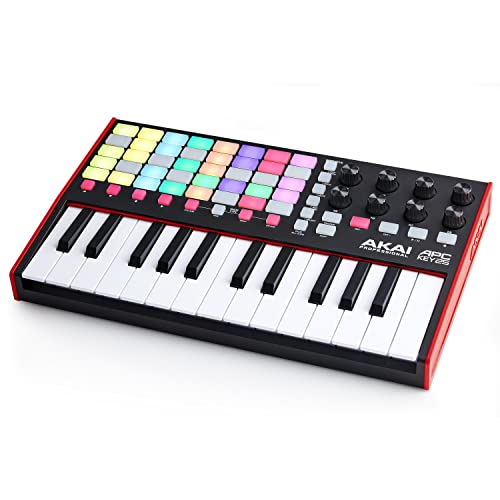
The APC Key 25 MK2 combines a compact 25-key keyboard with the classic APC clip-launching grid, creating a versatile all-in-one solution for mobile producers. Its 40 RGB pads are arranged in the familiar 5×8 matrix, providing direct visual feedback and control over Ableton’s Session View. The keyboard includes octave up/down buttons to access a full melodic range.
This controller is pre-mapped for seamless use with Ableton Live 11, making setup instantaneous. It’s an ideal travel companion or a secondary controller for quickly sketching ideas, offering essential hands-on control over clips, transport, and eight assignable knobs in a very compact footprint.
Arturia KeyLab Essential 61 Mk3
The Arturia KeyLab Essential 61 Mk3 provides outstanding value, pairing a full 61-note keyboard with deep software integration. It comes with Analog Lab software, giving you access to thousands of synth sounds, and is also designed to work smoothly with Ableton Live. The keyboard features aftertouch for expressive playing, along with pitch and mod wheels.
Its control set includes 9 faders, 8 knobs, and transport controls, all of which can be mapped to parameters in Live. The dedicated DAW control section allows you to navigate your project, adjust the mixer, and control the sequencer. For keyboard players needing a wide key range and plenty of physical controls without a high cost, this is a strong contender.
What to Look For in the Best Controllers for Ableton Live
When I’m looking for a new controller to use with Ableton Live, I don’t just grab the shiniest one. I think about how it fits into my actual workflow. The first thing I consider is integration. A good controller for Ableton Live should feel like an extension of the software, not a separate piece of gear I have to fight with. That means dedicated controls for Session View clip launching, track arming, and device macros. The best ones map themselves automatically when I plug them in, so I can start making music right away instead of spending hours on setup.
Next, I look at the build quality and the type of controls. Do I want pads, keys, or both? If I’m mostly a beat-maker, a grid of velocity-sensitive pads is non-negotiable. If I play melodic parts, a good keybed with aftertouch might be my priority. I also check the knobs and faders. Are they endless encoders (which are great for not jumping values) or standard pots? How do they feel? Wobbly knobs are a deal-breaker for me. The size and portability matter a ton, too. If I’m always on the move, a compact, bus-powered unit is a lifesaver. If it lives in my studio, a larger format with more controls might be the better choice.
Finally, I think about the extras. Does it include useful software? Many controllers come with a “Lite” version of Ableton Live or some solid virtual instruments, which is a huge value add if you’re just starting out. I also consider its connectivity. Does it need its own power supply, or can it run from my laptop’s USB port? Are there pedal inputs for sustain or expression? By focusing on how I actually make music—launching clips, tweaking synths, recording ideas—I can cut through the specs and find a controller that genuinely improves my sessions with Ableton Live.
FAQ
Do I need a special controller to use with Ableton Live?
Not at all. You can use your computer keyboard and mouse for everything. However, a dedicated hardware controller makes the experience much more tactile, intuitive, and fun. It lets you play and adjust multiple parameters at once with your hands, which can really change how you interact with your music. Many are designed specifically for tight integration with Live’s features.
What’s the difference between a MIDI keyboard and an Ableton-focused controller?
A standard MIDI keyboard is primarily about the keys for playing notes. An Ableton-focused controller, like the Push or Launchpad, emphasizes clip launching, scene triggering, and device control, often with a grid of pads instead of traditional keys. Many modern “hybrid” controllers combine a good keybed with these dedicated Ableton Live controls, giving you the best of both worlds.
Can I use multiple controllers at the same time?
Absolutely. This is a powerful way to work. I might use a grid controller for drums and clip launching, a keyboard for playing chords and melodies, and a separate unit with lots of knobs for mixing and effect tweaks. Ableton Live handles multiple MIDI inputs easily. Just make sure your computer can handle the USB connections or that you have a proper USB hub.
Is the Ableton Push worth it over other options?
The Push is the ultimate integrated hardware instrument for Ableton Live. It’s built from the ground up for the software, offering deep menu diving, step sequencing, and visual feedback on its screens. If Live is your central creative hub and you want the most complete hardware companion, it’s a fantastic investment. For more budget-conscious or specialized workflows (like just clip launching or just keys), other controllers on the list might be a better fit.
How important are aftertouch and velocity-sensitive pads?
For expressive playing, they are very important. Velocity sensitivity means how hard you hit a pad or key affects the volume or tone, adding human feel. Aftertouch is pressure you apply after the initial strike, often used to add vibrato, filter sweeps, or other modulation. If you want dynamic, performative recordings, look for these features. If you’re mainly sequencing or drawing in notes, they are less critical.