Is your home organization system held together by peeling tape and faded, handwritten scraps? Conquering the chaos of closets, pantries, and craft rooms starts with clear, consistent identification. A dedicated label maker is the secret weapon for creating a tidy, functional space where everything has its place, saving you time and frustration during your daily routine.
From simple, portable devices for kitchen jars to advanced models for serious crafters and DIY enthusiasts, the right label maker can streamline your entire home. This roundup cuts through the clutter to present the best options on the market, helping you find the perfect machine to bring order and a professional touch to your domestic landscape.
The Best Label Makers for an Organized Home
- Epson LabelWorks LW-400 Label Maker
- Brother P-touch Label Maker, PTD600
- DYMO LabelWriter 450 Direct Thermal Label Printer
- Brady Handheld Color Label Printer with Keyboard
- Brady BMP41 Portable Industrial Label Maker with Hard Case
- Brother P-touch, PTD600VP, PC-Connectable Label Maker
- Phomemo M110 Label Maker – Portable Bluetooth Maker Machine
- LABELWORKS Epson LW-PX400 Industrial Label Maker Kit
- Brother PT-E560BTVP P-Touch Edge Handheld Industrial Label Printer
- DYMO LabelManager 280 Portable Label Maker
Epson LabelWorks LW-400 Label Maker

The Epson LabelWorks LW-400 is a feature-rich device perfect for general home organization. Its backlit display allows you to type and edit labels even in dimly lit closets or cabinets, making the labeling process smooth regardless of your environment. This model is designed with efficiency in mind, producing labels with smaller margins to reduce tape waste by up to 62% compared to other brands.
You will have access to an amazing variety of customization options to make your labels stand out. With over 14 fonts, 10 text styles, 300+ built-in symbols, and more than 75 frames, the creative possibilities are nearly endless. It also supports barcode printing, adding functionality for inventory or personal asset management.
Brother P-touch Label Maker, PTD600

Brother’s PTD600 combines a smart, compact design with powerful features. The large, easy-to-use keyboard and convenient top-loading tape design make this labeler simple to operate without a steep learning curve. Its full-color, high-resolution display with a backlight provides a clear view of your label design before you print, ensuring perfect results every time.
This model offers flexibility in how you create your labels. You can use it as a standalone device with its wide keyboard, or connect it to a PC or Mac for additional design functionality and easier typing. This dual-mode operation makes it a great choice for both quick, simple labels and more complex projects.
DYMO LabelWriter 450 Direct Thermal Label Printer
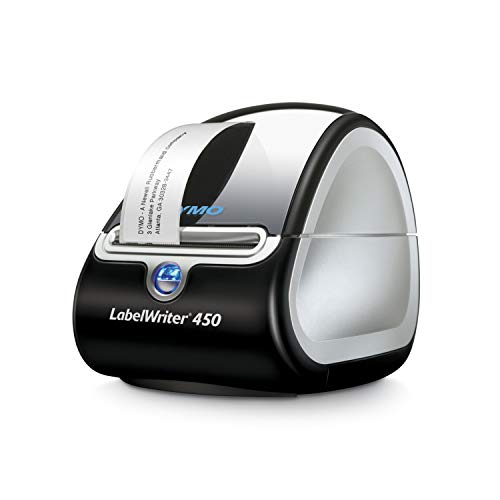
The DYMO LabelWriter 450 is a desktop workhorse designed for efficiency. It eliminates the waste and hassle of sheet labels by printing precise quantities on demand. As a direct thermal printer, it never requires ink or toner, saving you from ongoing supply costs and making it a low-maintenance option for a busy home office or craft room.
Speed is a key benefit of this model. Using the included DYMO software, you can quickly create and print a wide variety of labels, including addresses, file folders, and barcodes, at a rate of up to 51 labels per minute. This makes it ideal for large organizing projects where you need to label many items at once.
Brady Handheld Color Label Printer with Keyboard

Built for durability, the Brady handheld label printer is ready for tougher environments like a garage, workshop, or for organizing outdoor equipment. Its rugged exterior features molded rubber bumpers for impact resistance, ensuring it can handle accidental drops. The integrated keyboard and LCD screen allow for on-the-spot creation of multi-line labels.
This device is perfect for clear identification on a variety of surfaces. It prints text in a single color across six different font sizes, ranging from 6 to 40 point, giving you the flexibility to create both small, discreet labels and large, highly visible ones. Its industrial-strength design makes it a reliable tool for demanding household tasks.
Brady BMP41 Portable Industrial Label Maker with Hard Case

The Brady BMP41 is a professional-grade label maker that comes as a complete kit, including a protective hard case. This handheld unit is capable of creating multi-line labels for clear identification, making it suitable for complex organizing systems in a home workshop or for managing electrical panels. The QWERTY keyboard and backlit LCD graphics display work together for efficient labeling.
One of its most impressive features is the wide range of text sizes it can produce, from a small 4 point to a very large 103 point. This versatility allows you to create everything from tiny component labels to large, bold signs for bins and shelves. It’s a comprehensive solution for the serious DIY enthusiast.
Brother P-touch, PTD600VP, PC-Connectable Label Maker

The Brother PTD600VP offers the best of both worlds: it can be used as a standalone device or connected to a PC or Mac for enhanced design capabilities. This flexibility is ideal for users who sometimes need quick labels and other times require more detailed, customized designs. It can print labels with up to 7 lines of text and supports large character printing.
Personalization is a key strength of this model. With access to 14 fonts, 11 text styles, 99 frames, and over 600 symbols, you can create highly customized labels for asset management, business, or personal use. The included case and split-back tapes in the kit provide everything you need to get started on your organizing projects.
Phomemo M110 Label Maker – Portable Bluetooth Maker Machine
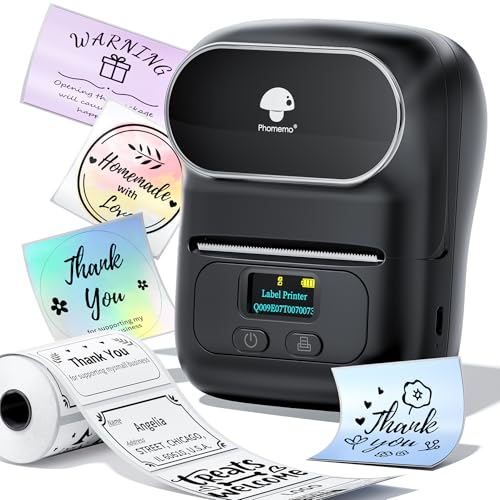
The Phomemo M110 is a modern, wireless label maker that connects to your smartphone via Bluetooth. Its lightweight and portable design means you can easily carry it in a bag and print labels from anywhere. The companion “Print Master” app provides a wealth of templates and editing tools, making it simple to create name labels, price tags, barcodes, and more.
This device uses thermal printing technology, so it never needs ink. The app supports Excel batch printing, which can significantly improve work efficiency for small business owners or for managing large home inventories. Note that this model is not designed for printing standard shipping labels.
LABELWORKS Epson LW-PX400 Industrial Label Maker Kit

The Epson LW-PX400 is an industrial-grade label printer built for high-performance and durability. It is specially designed for printing high-resolution labels on materials like heat shrink tube and self-laminating wrap, making it perfect for durable wire and equipment marking in a home workshop or for serious electronic projects. It meets rigorous industry standards for reliable performance.
This model supports a wide range of specialized tapes and can handle labels up to 1 inch (24mm) wide. With Bluetooth connectivity, it seamlessly integrates with smart devices and Windows PCs for wireless operation, giving you the flexibility to create and print labels without being tethered by a cable.
Brother PT-E560BTVP P-Touch Edge Handheld Industrial Label Printer

The Brother PT-E560BTVP is a top-tier industrial label printer equipped with Bluetooth. It can create professional, laminated labels and heat shrink tubes from 3.5mm to 24mm wide, offering exceptional durability for labels that need to withstand harsh conditions. Quick application keys for specific tasks like cable wrap and patch panel labels speed up your workflow significantly.
This printer enhances productivity with features like a dual auto-cutter, which can print a strip of half-cut labels for easy peel-and-apply action. You can also add QR codes and linear barcodes, and store databases and templates for quickly reprinting existing labels, making it an incredibly efficient tool for complex or repetitive projects.
DYMO LabelManager 280 Portable Label Maker
The DYMO LabelManager 280 is a portable and user-friendly device designed for everyday home and office organization. Its compact size makes it easy to store in a drawer and take with you around the house. With a full keyboard and clear display, creating simple, effective labels for bins, files, and kitchen containers is a straightforward process.
This label maker is known for its reliability and ease of use, making it a great entry-level option for those new to labeling. It helps bring instant order to cluttered spaces without a complex setup. Please check the product link for the most current features and compatible tape options.
Buying Guide: How to Pick the Right Label Maker for Your Home
I’ve found that a good label maker is a game-changer for keeping my home organized. But with so many options out there, from simple manual ones to fancy smart devices, it can be hard to know where to start. The best choice really depends on what you need it for. Let’s break down the key things I consider when looking for a label maker for home organization.
First, think about the labeling technology. There are two main types: thermal and ink. Thermal printers are my go-to for most home tasks. They don’t need ink or toner cartridges; they use heat to print on special tape. This means they’re generally cleaner, quieter, and more cost-effective over time. Ink-based models can print in multiple colors, but you have to deal with replacing ink, which I find to be a hassle and an extra expense.
Next, consider connectivity. Do you want a simple, standalone device, or one that connects to your phone? Basic models with a keyboard are fantastic for quick, simple labels. If you want more creative freedom—like custom fonts, borders, and symbols—a Bluetooth model that pairs with a smartphone app is the way to go. I use my phone for everything, so having an app to design labels is a huge plus for me.
Then there’s the tape. This is a big one. Look at the variety of tape colors and widths a machine accepts. A standard 12mm white-on-black tape is versatile, but being able to use different colors (like red for warnings or blue for the kitchen) makes organization much more intuitive. Also, check the cost and availability of replacement tapes. Some brands have proprietary tapes that can be pricier than more universal options.
Finally, think about portability and power. If you plan to carry your label maker around the house or to the garage, a compact, lightweight model is important. Check if it runs on rechargeable batteries, standard AA batteries, or needs a power outlet. A rechargeable model is convenient, but having the option to use standard batteries can be a lifesaver when you’re in the middle of a project and the battery dies.
By focusing on these areas—printing technology, connectivity, tape options, and portability—you can find the perfect tool to bring order to your space. The right label maker for home organization is the one that fits your specific routine and makes the process simple and even a little bit fun.
Frequently Asked Questions
What is the easiest label maker to use?
In my experience, the easiest label makers to use are the basic, keyboard-only models from brands like Brother P-touch. They are straightforward—you just type what you want and press print. There’s no app to learn or Bluetooth to connect. They are perfect for someone who wants simplicity and doesn’t need a lot of fancy fonts or graphics. If you’re not very tech-savvy or just want a no-fuss device, this is the type I would recommend starting with.
Are label makers worth the money for home use?
Absolutely, I think they are. While you can write on masking tape, a dedicated label maker creates clean, professional, and consistent labels that are much easier to read and last longer. It saves you time and frustration when you’re trying to find something in a pantry, a bin of holiday decorations, or a box of cables. The initial investment pays off by reducing clutter and making your systems more sustainable. It’s one of those small tools that has a big impact on daily life.
What kind of labels stick best on different surfaces?
This is a great question because not all labels are the same. For most smooth, hard surfaces like plastic bins, glass jars, or metal filing cabinets, a standard adhesive tape works perfectly. For rougher surfaces like wood or cardboard, you might want a stronger, permanent adhesive. For surfaces you plan to change often, like spice jars or kids’ toy bins, a removable adhesive is a must. Some tapes are even designed to be extra durable and resistant to water, chemicals, or fading, which is ideal for a garage or workshop. Always check the tape specifications for the surface you’re planning to label.
Can I use my phone as a label maker?
You can’t use your phone by itself, but you can use it as the brain for a Bluetooth label maker. Many modern label makers connect to a companion app on your smartphone. This lets you design labels with a much wider range of fonts, symbols, and layouts than a built-in keyboard would allow. You can even save frequently used phrases or create QR codes. So, while your phone needs the physical printer to produce the label, it greatly expands your creative options and is a core feature of many modern devices designed for home organization.
How do I decide between a thermal and an ink-based label maker?
For almost all home organization needs, I would suggest a thermal label maker. They are less messy because there’s no ink to smudge or run out of at a bad time. The ongoing cost is usually lower since you only have to buy tape, not combined tape-and-ink cartridges. Thermal labels are also generally more durable and resistant to water and fading. An ink-based printer really only makes sense if you have a specific need for full-color printing or photos on your labels, which is rare for typical home organizing tasks.